> For the complete documentation index, see [llms.txt](https://bluecallom.gitbook.io/enterprise-ai-platform-guide/llms.txt). Markdown versions of documentation pages are available by appending `.md` to page URLs; this page is available as [Markdown](https://bluecallom.gitbook.io/enterprise-ai-platform-guide/account-setup.md).
# Account Setup
Welcome to the Account Setup guide. Before you can begin building solutions, managing your organization, or collaborating with partners, you need to configure your account for the appropriate level of access. This section provides detailed, step-by-step instructions for activating the specific account type that matches your role.
A crucial first step for all account types is connecting your personal BlueCallom profile to your company. This ensures all your activities are correctly associated with your organization and is a prerequisite for requesting elevated access.
### Prerequisite: Connect to Your Company
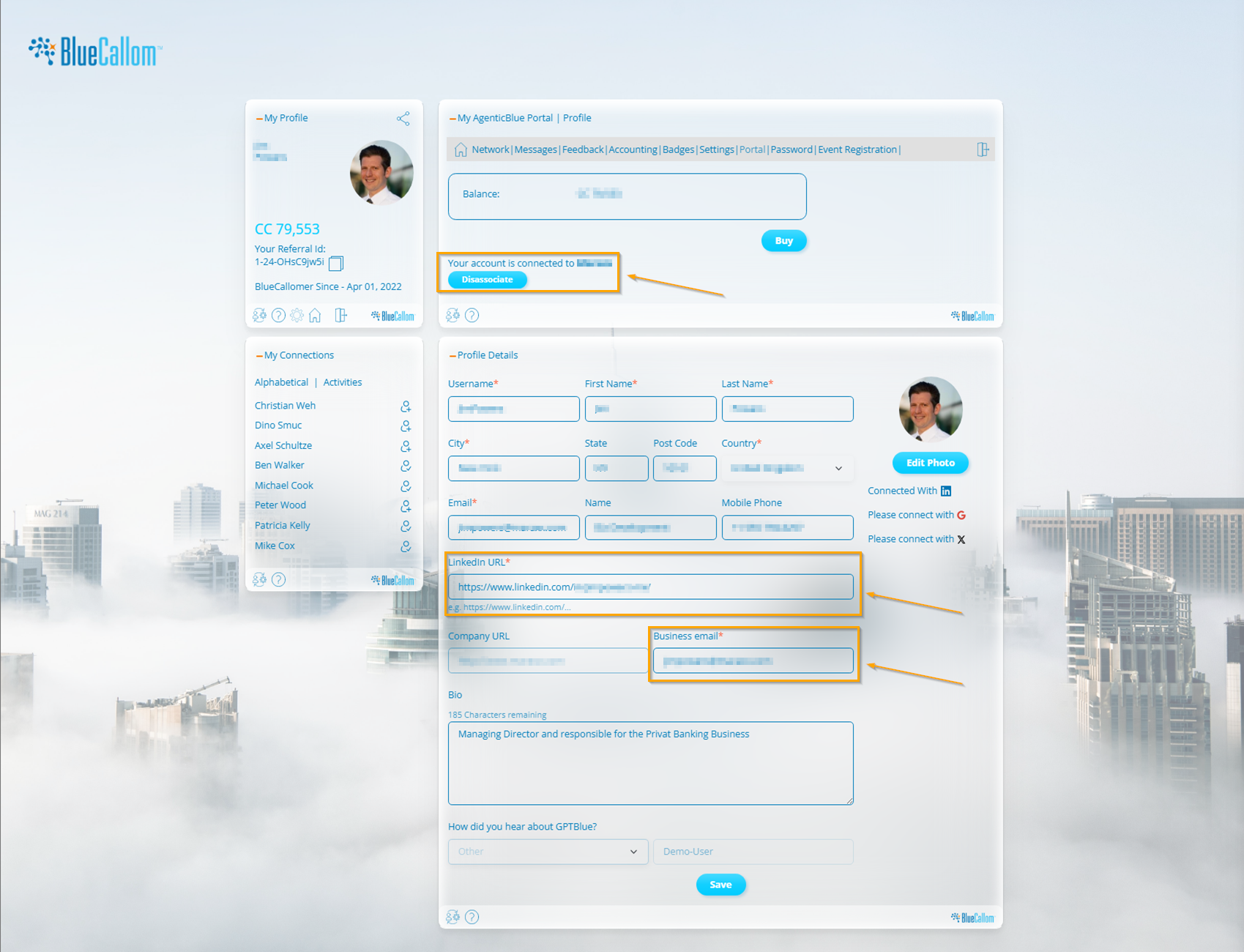
Before you can request developer access, you must first link your personal BlueCallom account with your company's profile. This is a crucial step for verification and ensures that all development work is correctly associated with your organization.
1. Navigate to your **My AgenticBlue Portal** by clicking on your profile icon.
2. In the **Profile Details** section, ensure the following fields are accurately filled out:
* **LinkedIn URL:** Your personal LinkedIn profile URL.
* **Company URL:** Your company's official website.
* **Business email:** Your official email address at your company.
3. Once these fields are saved, your account status will show that you are connected to your company.
> \[!TIP] Keeping your profile updated is essential for seamless collaboration and access management on the platform.
### Account Types
This section will guide you through setting up one of the following specialized accounts:
* [**Developer Account**](broken://pages/XdH6DV7m1x9nBUVI5Av8)**:** For technical users, developers, and creators who want to build, test, and deploy their own AI Assets using the GPTBlue Studio.
* [**Corporate Account**](/enterprise-ai-platform-guide/account-setup/corporate-account.md)**:** For administrators and System Managers who need to govern their organization's instance, manage users and teams, oversee the coin economy, and control asset libraries.
* [**Partner Account**](/enterprise-ai-platform-guide/account-setup/partner-account.md)**:** For business partners, consultants, and resellers who collaborate with BlueCallom to co-develop, distribute, or implement AI solutions.
Please select the guide that corresponds to the access level you require to get started.
---
# Agent Instructions
This documentation is published with GitBook. GitBook is the documentation platform designed so that both humans and AI agents can read, navigate, and reason over technical content effectively. Learn more at gitbook.com.
## Querying This Documentation
If you need additional information that is not directly available in this page, you can query the documentation dynamically by asking a question.
Perform an HTTP GET request on the current page URL with the `ask` query parameter, and the optional `goal` query parameter:
```
GET https://bluecallom.gitbook.io/enterprise-ai-platform-guide/account-setup.md?ask=&goal=
```
`ask` is the immediate question: it should be specific, self-contained, and written in natural language.
`goal` is optional and describes the broader end goal you are ultimately trying to accomplish on behalf of the user. GitBook uses it to tailor the answer towards what is most useful for that goal.
The response will contain a direct answer to the question and relevant excerpts and sources from the documentation.
Use this mechanism when the answer is not explicitly present in the current page, you need clarification or additional context, or you want to retrieve related documentation sections.